6. Clustering#
From the previously-obtained features, we can now cluster the data. We will use the K-means algorithm, which is a simple and efficient algorithm for clustering. Depending on the task at hand, other algorithms may be more appropriate.
[29]:
import pickle

import matplotlib.pylab as plt
import numpy as np
import obspy
from scipy import signal
from sklearn.cluster import KMeans
[30]:
%config InlineBackend.figure_format = "svg"
Load ICA features#
We first load the features calculated in the notebook 4. We will use the features extracted with the independent component analysis (ICA) as input for the clustering algorithm. This is not mandatory, and you can use the features extracted with the scattering network instead. We here opt for the ICA features because they lie in a lower-dimensional space, which makes the clustering algorithm more efficient.
[31]:
# Load features and datetimes from file
with np.load(
    "../example/independent_components.npz", allow_pickle=True
) as data:
    features = data["features"]
    times = data["times"]

# Load network
network = pickle.load(open("../example/scattering_network.pickle", "rb"))
Apply K-means clustering#
We now perform the clustering. We will use the \(k\)-means algorithm, which is a simple and efficient algorithm for clustering. The \(k\)-means algorithm solves the following optimization problem:
where \(\mathbf{C} = \{\mathbf{c}_1, \ldots, \mathbf{c}_K\}\) is the set of cluster centers, \(\mathbf{Z} = \{z_{1}, \ldots, z_{N}\}\) is the set of assignment vectors, and \(z_{ik} = 1\) if \(\mathbf{x}_i\) is assigned to cluster \(k\) and \(z_{ik} = 0\) otherwise. The assignment vectors are also called responsibilities.
The \(k\)-means algorithm requires the number of clusters as input. Several methods exist to determine this number. Here, we define this number manually. We first instantiate the model and optimize it. We define the number of clusters arbitrarily to 4, since we know that we do not have more than 4 relevant features from notebook 4. We then fit the model to the data and predict the cluster labels for each sample.
[32]:
N_CLUSTERS = 4

# Perform clustering
model = KMeans(n_clusters=N_CLUSTERS, n_init="auto", random_state=4)
model.fit(features)

# Predict cluster for each sample
predictions = model.predict(features)
Visualize cluster-wise detection rate#
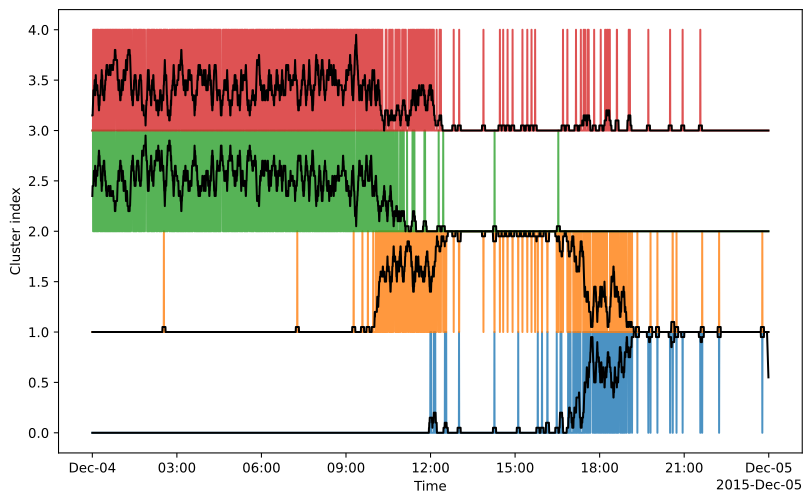
A way to visualize the clustering results is to plot the cluster-wise detection rate as a function of the cluster number. This is done by computing the detection curve for each cluster using one-hot encoding, then averaging the results in a sliding window with a given smoothing kernel. The detection rate of a given cluster is given by the one-hot encoding of the cluster label as a function of time. We smooth the detection rate by cluster by convolving it with a boxcar window (running average).
[33]:
SMOOTH_KERNEL = 20

# Convert predictions to one-hot encoding
one_hot = np.zeros((len(times), N_CLUSTERS + 1))
one_hot[np.arange(len(times)), predictions] = 1

# Plot the results
fig, ax = plt.subplots(figsize=(10, 6))

# Plot each cluster as a separate line
for i in range(N_CLUSTERS):

    # Obtain the detection rate by convolving with a boxcar kernel
    detection_rate = (
        np.convolve(one_hot[:, i], np.ones(SMOOTH_KERNEL), mode="same")
        / SMOOTH_KERNEL
    )

    # Plot the detection rate
    ax.plot(times, one_hot[:, i] + i, alpha=0.8)
    ax.plot(times, detection_rate + i, color="black")

# Labels
ax.set_xlabel("Time")
ax.set_ylabel("Cluster index")

plt.show()
Interpret clustering results#
Cluster 0 is related to the stable tremor phase and Cluster 1 corresponds to the onset of the tremor signal. Cluster 3 does not seem very meaningful (waveform visualization will help later) and Cluster 2 is related to the pre-tremor phase. The clustering finds the groups of signals related to non-tremor time and tremor time. From the reconstruction of before and by looking at the original data, we know that the tremor signal is the most dominating signal in the data. Therefore, the clustering makes sense.
Examine cluster centroids#
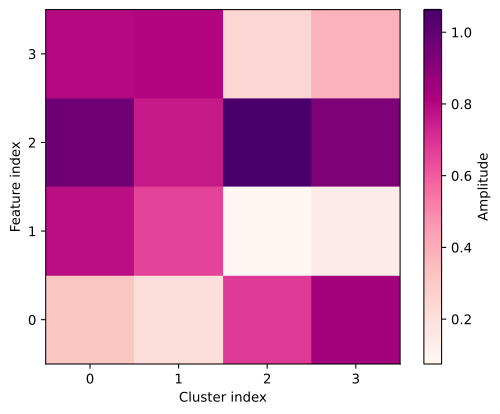
The centroids of the cluster can indicate if we have a dominating feature for a given cluster. Through the reconstruction we can then understand what the cluster might contain. For example, here we see that cluster 3 is mostly constrained by feature 2. From the reconstruction we remember that feature 2 separates the tremor from the non-tremor period and cluster 3 is mainly related to the non-tremor period.
[34]:
centroids = np.abs(model.cluster_centers_)

# Plot the centroids
fig = plt.figure()
ax = plt.axes()

# Show the centroids as a heatmap
mappable = ax.matshow(centroids.T, cmap="RdPu")

# Labels
plt.colorbar(mappable).set_label("Amplitude")
ax.set_xlabel("Cluster index")
ax.set_ylabel("Feature index")

# Ticks below
ax.xaxis.set_ticks_position("bottom")
ax.set_xticks(np.arange(N_CLUSTERS))
ax.set_yticks(np.arange(centroids.shape[1]))
ax.invert_yaxis()

# Show
plt.show()
Extract representative waveforms#
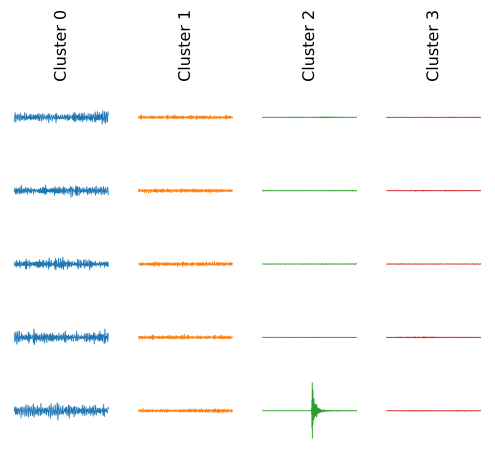
Another way of visualizing the clustering results is to extract the waveforms corresponding to each cluster. We can then plot the most representative waveforms for each cluster. We here extract the five most representative waveforms within each cluster. We narrow the focus on a single component of the waveforms, but the cell can be adapted to show all components at once.
[35]:
N_WAVEFORMS = 5

# Read the stream
stream = obspy.read("../example/stream.mseed").select(channel="HHE")
waveform_duration = network.bins / network.sampling_rate

# Extract waveforms
waveforms = list()
for cluster in np.unique(predictions):

    # Calculate the distance of each sample to the cluster mean
    mean = np.mean(features[predictions == cluster], axis=0)
    distance = np.linalg.norm(features[predictions == cluster] - mean, axis=1)
    closest = times[predictions == cluster][distance.argsort()[:5]]

    # Collect closest waveforms in a list
    traces = list()
    for time in closest[:N_WAVEFORMS]:
        time = obspy.UTCDateTime(time)
        trace = stream.slice(time, time + waveform_duration)[0].copy()
        traces.append(trace)
    waveforms.append(traces)
Visualize waveforms by cluster#
We now plot the waveforms. We plot the five most representative waveforms for each cluster in separate axes with equal limits for comparison. Note that the very same stream that was used to infer the features and clusters are shown here.
Cluster 0, identified as the later tremor phase in the data, shows high amplitude signals. Cluster 1, identified as the tremor onset, shows smaller amplitudes compared to cluster 0. Cluster 2 shows again smaller amplitudes, however we can see one time series containing an impulsive event. Perhaps cluster 2 contains earthquake-like signals. Cluster 3 seems to contain mainly the ambient seismic noise of the data.
[36]:
# Plot the results
fig, ax = plt.subplots(
    N_WAVEFORMS, N_CLUSTERS, sharex=True, sharey=True, dpi=300
)

# Plot each cluster as a separate line
for i, traces in enumerate(waveforms):
    ax[0, i].set_title(f"Cluster {i}", rotation="vertical")
    for j, trace in enumerate(traces):
        ax[j, i].plot(
            trace.times(), trace.data, rasterized=True, lw=0.6, color=f"C{i}"
        )
        ax[j, i].set_axis_off()

# Show
plt.show()